How to Fix Mouse Lag in Windows 10
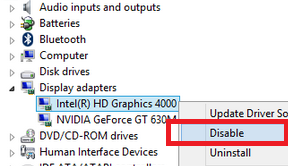
Mouse lag is another problem for Windows 10 users and normally force them to revert back to Windows 8.1. There cause is different from one to another Laptop or PC. The culprit could be your hardware or your OS configuration. Here is the common fix for the lag mouse problem in Windows 10. 1. Disable Cortana Open Task Manager (don't ask why), if you notice the mouse lag gone you need to disable Cortana in order to solve your problem. If you love Cortana and still want to resolve pointer lag problem, open Task manager every time you want to use your PC. 2. Disable Intel Graphic or Nvidia High Definition Audio. If your laptop/PC have 2 graphic chip, Disabling the Intel graphic would resolve the issue. In laptop terms, a laptop which have 2 graphics chip called Switchable Graphic.This feature use to control power usage with the ability to switch from high performance (Nvidia or ATI) to standard performance (Intel Graphic). You can disable Intel graphic by open Device Manager, Unde...