Posts

Showing posts with the label Videos

How to convert and play ts video File
Image
You can directly play the video with TS file extension or file format using video player such as VLC , KMP or default Windows Media Player. However if you connect your computer to PC via HDMI you will notice you will get no audio output. Further more your iphone, android devices or tablet maybe would not read the and play the file. So first we need to convert it to MP4 because this file format widely supported for most current device. It is actually simple: 1. Download free ts video converter form here: http://download.cnet.com/Free-TS-Converter/3055-2194_4-75738853.html   or you may google for other type of free ts converter software. 2. Convert the file and wait until finish.The conversion time depend on the file size and length. Now you will have another instance of the file with mp4 file format.

How to Play Videos/Movies on DVD with USB Playback

I have a LG DVD player with USB slot which support Video Playback , however it does not support mp4, flv and AVI videos which I downloaded from Internet. So, to solve this problem I searched the DVD specification to identify what type of video format I need to use in order to play those videos. By looking at the technical specification, the LG DVD I have support following video formats. MPEG-1 MPEG2 PS/TS MPEG4 DivX VOB Which one to choose?, since conversion of a movies could take more than 2 hours, I decided to look for more information. The specs, they also metion "while USB 2.0 Plus allows you to play back any JPEG, MP3 or DivX file stored on a USB memory device". So, thats it, I convert the file into DIVX format and it works! 1. Download the Divx converter here: http://www.divx.com/en/software/converter/features 2. Upon installation it would ask for registration and serial no, just skip it and use the free version. 3. Add the file and convert your file to ...

How to Play Subtitle on TV with USB

Image
Most modern Flat Screen TV (LCD or LED TV) allow you to play movie directly from USB. If you want to play the movie with subtitle what you need to do is: 1. Download the movie subtitle form any subtitle site such as subscene.com or opensubtitles.net 2. Now move both movie file and subtitle file to your USB device. 3. Change the subtitle file name with the movie file name so that both have the same file name (the file extension/format will remain differ to each other). 4. Then plug the USB drive into your TV and play the movie. 5. Press the subtitle button to display the subtitle when the movie start playing. Example for Sony Flat Screen press the Green Button. Additional notes: Most subtitle format available online is srt. However you can change the subtitle from .sub to .srt using online subtitle converter.

How to Change Subtitle Framerate

Image
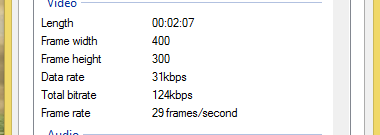
 Most of the time the video/movies provided on the internet was 25 fps while common subtitle fps are 23 fps or 29 fps. This will cause subtitle delay, no matter how many times you adjust the time synchronization the subtitle will keep delay over time. You can check your video framerate by right click on it and select properties-details. So here is how to solve this problems: 1. Download SubtitleEdit-3.4.6 from www.nikse.dk/subtitleedit 2. Select the standalone package, download it and extract the zip file. 3. You can also download the installer package if you prefer to install it in your computer. 4. Run the program and load the subtitle you want to change the framerate. 5. On the top panel select synchronization and select change framerate. 6. Now key in the new framerate and save the subtitle file. The common subtitle framerate is 23 fps for DVD and 29 fps for bluray. Most of the time I just test until I got the right value.

How to play and convert m3u8 video file

Image
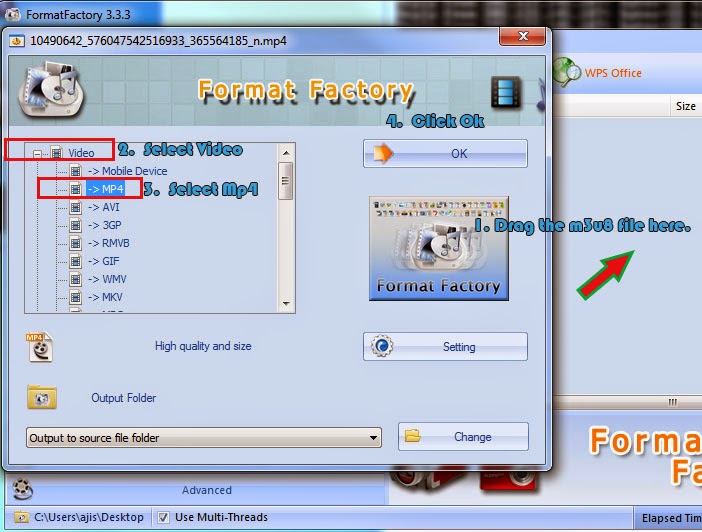
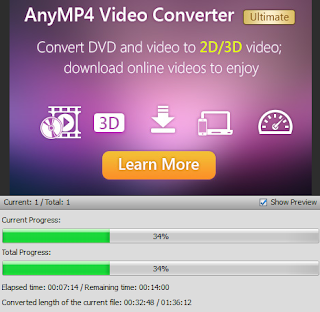
If you are looking for m3u8 Video player will not be able to get one, because this extension in most cases classified as a Audio File and not a Video File. If you are looking to play the m3u8 audio, you can use Windows media player for Windows and iTunes for Mac. If it is a video you need to convert the file first. Convert m3u8 file into Mp4 First of all, if the m3u8 file you want to open is a video file, you cannot use software like KMPlayer or VLC to open it. If you do you will only have the audio playing with a blank screen. So first you need to convert it into mp4 file. Here are the steps you need to convert the m3u8 file extension into mp4 Video file: 1. Download and Install format factory which is a free video converter. 2. Now open format factory and drag the m3u8 file into program. 3. After that it will ask which file type you want to convert. Expand the Video and select mp4. You can use format factory to convert any video/audio file into any format 4. Now click s...