How to enable hardware virtualization in bios
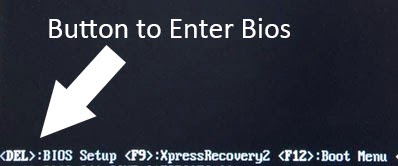
You can enable and disable hardware virtualization by change your BIOS setting. Here is a simple explanation on how to enable hardware virtualization for both Intel virtualization Technology (vt,vt-x) and AMD Virtualization (AMD-v). 1. Make sure your system support virtualization technology. You can use Microsoft Hardware-Assisted Virtualization Detection Tool if your processor support virtualization. You can also use securable and this program does not require any installation, just download and run the program. 2. Power on your PC and enter BIOS setting. I use Gigabyte motherboard so Upon power on, I just press DEL (delete) button to enter BIOS. Depend on your motherboard, you may need to press different key to enter BIOS such as F2 and F6(notebook). Upon booting, your post screen will show what key you need to press to enter BIOS. 3. Now locate the BIOS feature or BIOS setting , from here you will see the option to enable and disable your BIOS setting. On my Gigabytes BI...